This post contains affiliate links. As an Amazon Associate I earn from qualifying purchases. If you click a link and make a purchase, I may receive a small commission at no extra cost to you.
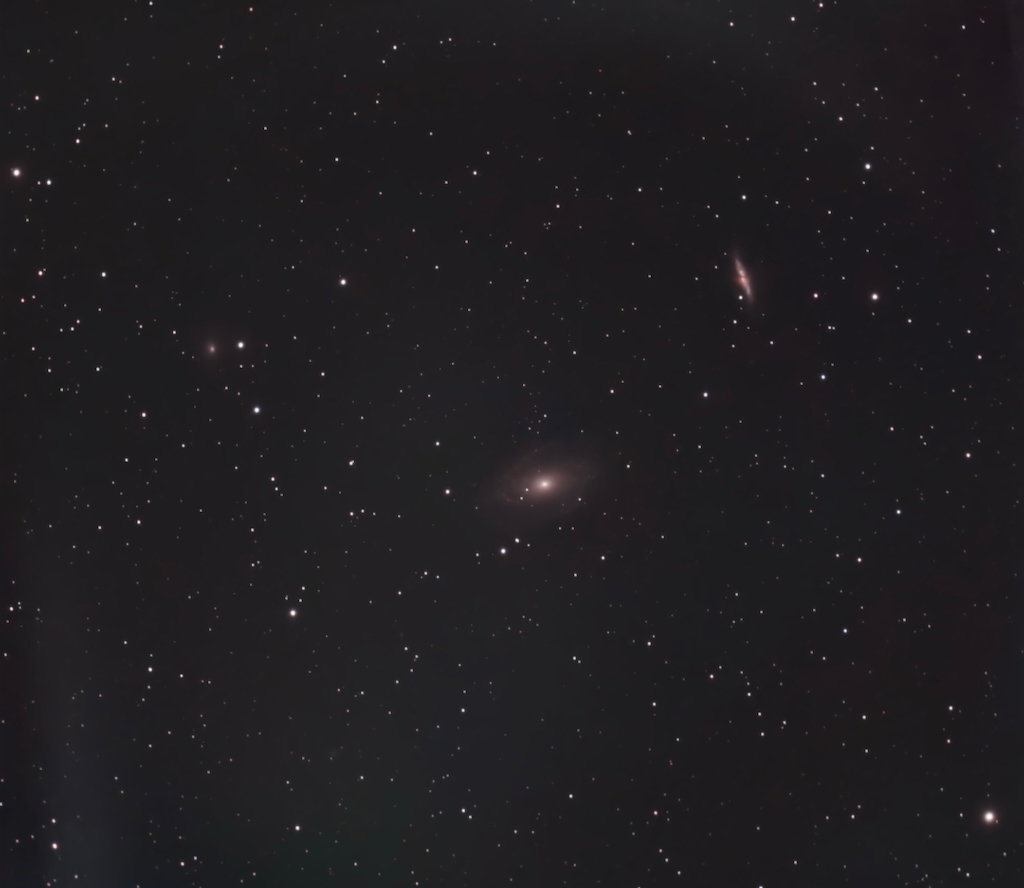
I finally got a proper (well, mostly proper) long session in with the SeeStar S30 Pro — eight hours pointed at M81, Bode’s Galaxy. Not perfectly executed by any means, but enough time to push the scope harder than I had before and learn a few things in the process.
Here’s what came out of it.
Photo Details
- Object: M81 (Bode’s Galaxy)
- Telescope: SeeStar S30 Pro
- Constellation: Ursa Major
- Exposure time: 20 seconds
- Duration: 322 minutes
- Other: Light pollution filter on
Field Notes
This was my first time experimenting with 20-second exposures, and since I don’t have an equatorial mount, I wasn’t entirely sure how the scope would handle it.
The short answer: pretty well, all things considered, but this session came with some important lessons.
There was noticeable discoloration and streaking around the edges of the image. It has an almost crinkled, dark-paper quality to it in some images.
I have a couple of theories about where it came from, and I think it was probably a combination of things working against me at once.

The most obvious culprit was the horizon.
M81 was getting low by the end of the session, and some of my lights actually had the tree line obscuring the frame. Once I discarded around 30 of those, the edge artifacts reduced noticeably, so I know that was a real factor.

But even after pulling those frames, some issues remained.
My best guess is that the combination of low altitude, heavy light pollution at that part of the sky, and the longer exposure time all compounded on each other. At 20 seconds, the scope is picking up a lot more than at 10 — including things you’d rather it didn’t.
The lesson I’m taking from this: longer exposures are probably best saved for objects that are going to stay reasonably high in the sky for the duration of the session.
Shooting for eight hours gave M81 plenty of time to drift low toward the horizon, and that showed in the result. It’s something I’ll plan around more carefully going forward.
The good news is that cropping to the center gave me a solid image (all things considered). When I look closely I can make out the spiral arms pretty clearly, and the overall structure of the galaxy reads well. Sometimes you work around a problem and still come out with something decent enough to call progress.

One other thing I got to explore this session was stacking inside the app. (This is the manual option versus the automated stacking the app does while it takes the images.)
You can go into the stacking menu, select albums (even from multiple sessions), and stack them together right there without needing any external software.
It was great to finally figure that out. I’d botched a number of frames and needed to be selective, but even with all of that the total stacking time came in around 45 minutes. Knowing how to do this properly opens up a lot of possibilities for building up exposure time across multiple nights.
One more thing worth noting: I learned that the light pollution filter I’ve been running isn’t actually necessary for most targets. It’s really only beneficial for certain types of nebulae, and the app is supposed to trigger it automatically when needed. Going forward I’ll be leaving it off for galaxy imaging — something I wish I’d known before this session.
Processing
I’ve started experimenting with Siril, but I haven’t quite cracked it yet. The processed results still aren’t where I want them, as most objects look way worse than what SeeStar creates. So I’ll keep testing. I just realized there’s a special Seastar script for Siril and that my version of the software was outdated so hopefully addressing those things in the future will help.
But for this session, the in-app editing ended up doing the heavy lifting, and honestly I was pretty happy with what it produced.
The more I use the app tools the more I appreciate how capable they are, especially when you’re still getting a feel for a new scope.
Final Word
M81 is a great target for the S30 Pro, but this session reinforced something I’m starting to notice the more I shoot galaxies with this scope: the field of view is just a touch wider than you’d ideally want for objects this size.
You always feel like you’re just a bit further out than you’d like to be, wishing you could get in there a little closer. That said, when there’s real detail to work with — spiral arms, clean core — the S30 Pro does pull it out if you look for it.
For galaxies that aren’t on the scale of Andromeda, M81 is probably one of the better ones to go after with this scope. And for the larger targets — the big nebulae, the wide-field showpieces — I suspect this thing is really going to shine.
I’m already thinking about doing another run on M81 and stacking it with this session to see how much more I can pull out of it. More on that if it happens.